
X-DIAG all in one car diagnostics
Activation and Update ONLINE any automotive scanners , Thinkdiag and AUTEL Maxi AP200
- Engine (Engine – ENG, DME, DDE, CDI, ERE, etc.);
- Anti-lock braking systems(ABS);
- Passive safety systems (SRS, AirBag);
- Air conditioners and climate control systems (AC/Heater -AAC, Climate Control);
- Immobilizers and other anti-theft equipment;
- Car suspension (Airmatic, etc.), Cruise control systems(Cruise Control -CC);
- Audio and video systems(CD-changer, TV-tuner, Audio system);
- Navigation and communication systems;
- Control systems for seats, glasses, sunroofs, mirrors, headlights;
- Reading, decoding and deleting error codes;
- Reading information from sensors and displaying current parameters;
- Electronic control units coding;
- Resetting service intervals;
- Activation of executive mechanisms;
- Huge list of supported car brands;
- And much more
X-Diag compatible Scanners & connectors







1) Installation
Installing app .
In the menu, select “Update”
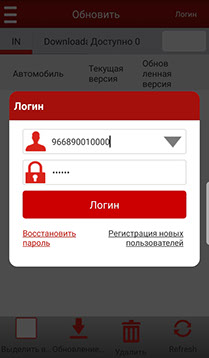
2) Authorization
We enter the username and password received from us, which we sent to you, after registering your adapter on the server.
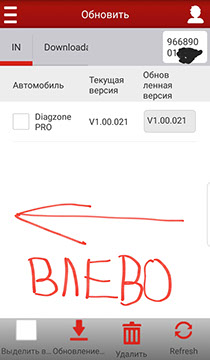
3)Activation
Swipe the screen to the left (to activate by the adapter number).
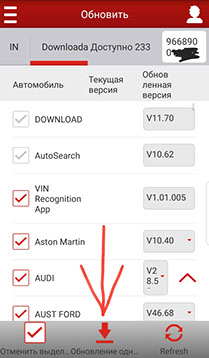
4) Update
At the bottom, select “Update with one click” and select the brand EOBD2 and DEMO (to activate by the adapter number).

5) Connection
Connect your adapter to the car and click ” Start checking”
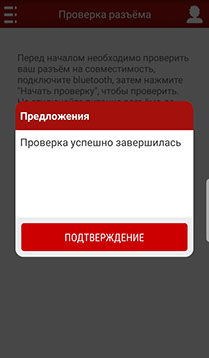
6) Syncing
The adapter is connected and flashed via Bluetooth

7) Loading car brands
At the bottom, select “Update with one click” and download all the brands to the device

8) Done
The download is complete. We choose the brand of the car for diagnostics